Notta is an AI notetaker and transcription tool: it records a meeting, transcribes an uploaded audio or video file, then pulls a summary out of it. It gets mentioned a lot, and its free plan invites a try. This review looks at what the tool really offers, what it costs, where the limits of the free plan hide, and how it compares with Otter, the name people mention next. Prices and features were checked on the official pages on October 23, 2026.
In short: Notta advertises 58 transcription languages, a free plan of 120 minutes a month (but 3 minutes maximum per conversation) and a Pro plan at $8.17 a month billed annually ($97.99 a year) with 1,800 minutes and recordings of up to 5 hours. It is a good fit if you transcribe meetings or interviews regularly. The free plan works more like a demo: to judge accuracy on a real file, plan on the trial or Pro. Compared with Otter, Notta gives more minutes and longer recordings for a similar price, but we did not compare accuracy.
Updated October 23, 2026. Links to Notta are affiliate links: we earn a commission if you subscribe, at no extra cost to you, and it does not change any figure quoted. The Otter link is a plain official link. This review relies on the official pages checked on the date shown: we did not time the tool or measure its accuracy on our own recordings, and we do not endorse the vendor’s accuracy claims.
In this article
What Notta is
Notta is an “AI notetaker”: an assistant that takes notes for you. It can record an online meeting (Zoom, Google Meet, Microsoft Teams, Webex) through a bot that joins the call, record on your device with no bot, transcribe an uploaded audio or video file, or transcribe from a YouTube link. It then shows the text with speaker identification and offers a summary, action items and, depending on the plan, documents or infographics.
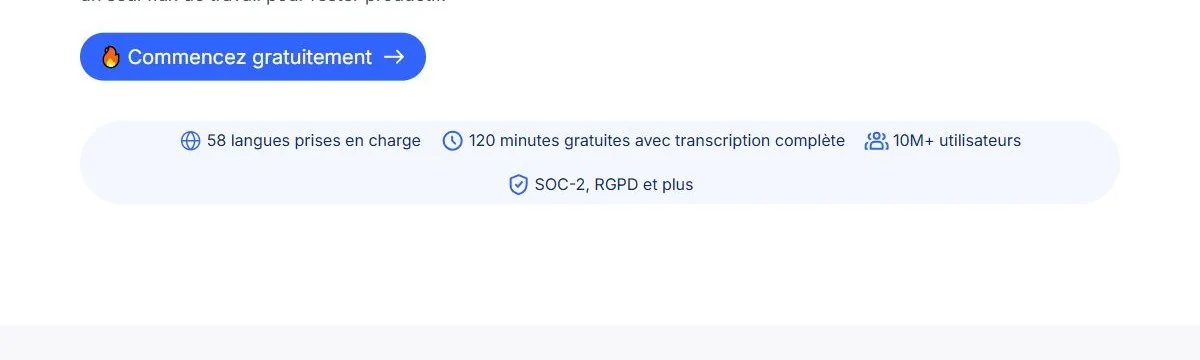
The vendor says it has more than 10 million users. That is a marketing figure we cannot verify. What we can verify is the price grid, below.
Notta pricing checked on October 23, 2026
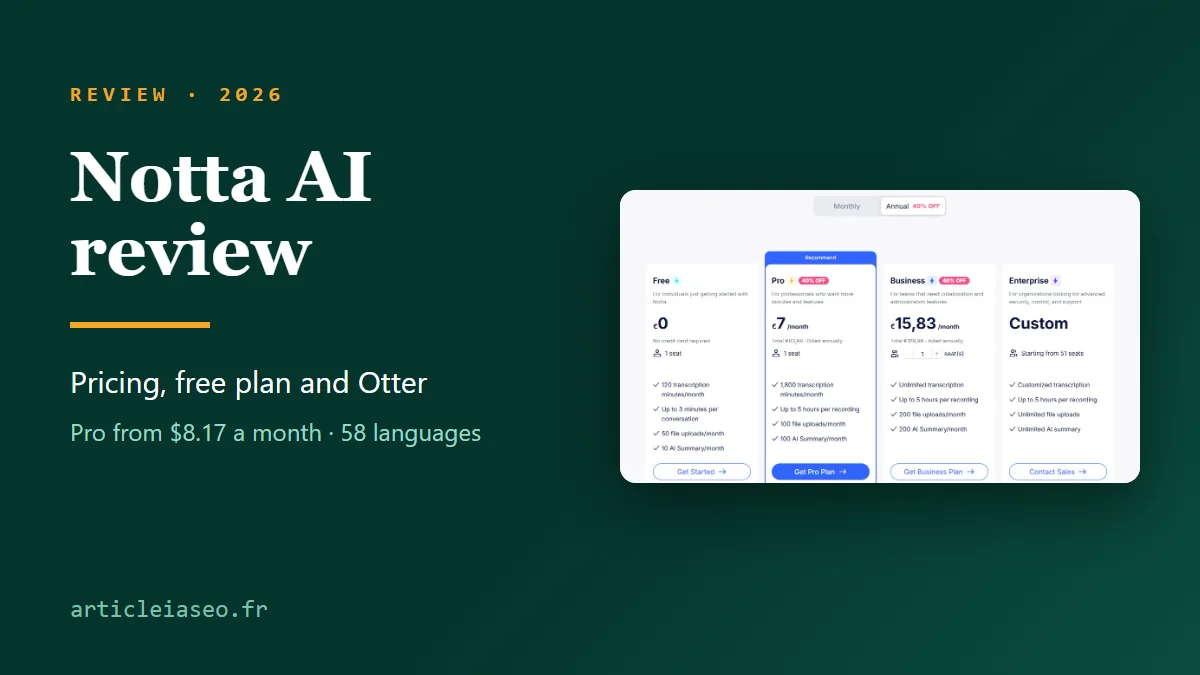
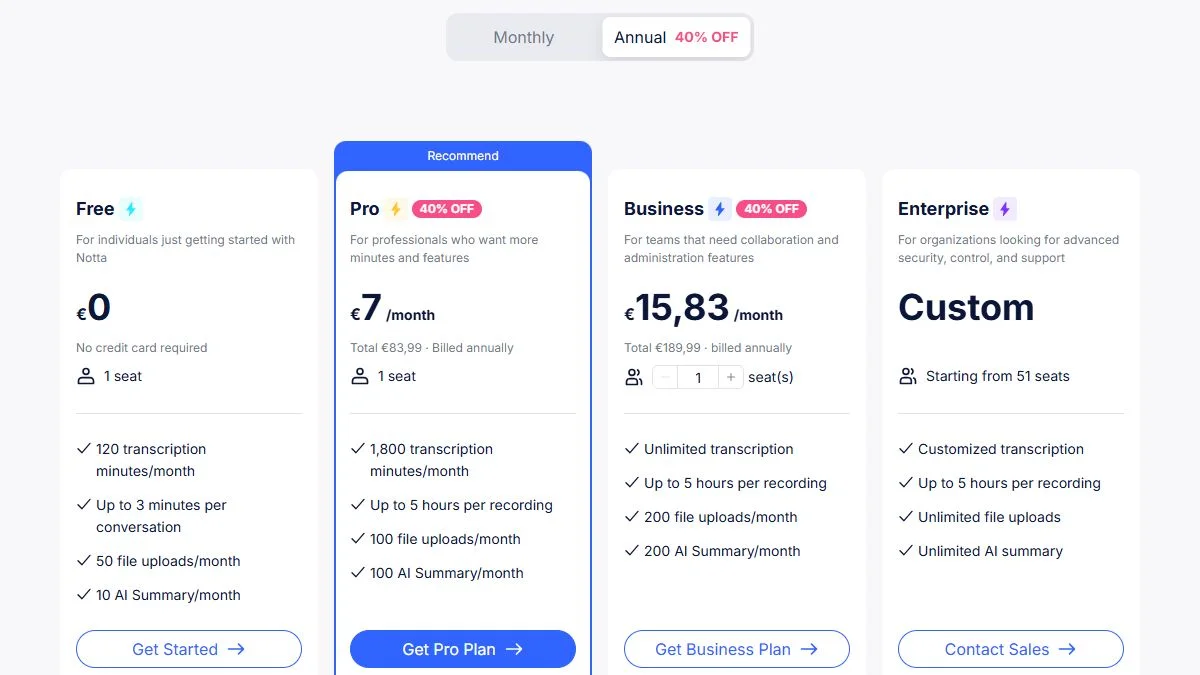
Notta shows four plans. The English page displays dollars, and yearly billing is presented with a 40% discount against monthly billing. Monthly prices in dollars were not shown on the English page when we checked, so we give the euro monthly prices seen on the French page for reference.
| Plan | Yearly (per month) | Monthly | What changes |
|---|---|---|---|
| Free | $0 | $0 | 120 min a month, 3 min per conversation, 50 file uploads a month, 10 AI summaries |
| Pro | $8.17 ($97.99 a year) | €11.69 (French page) | 1,800 min a month, up to 5 hours per recording, 100 file uploads, 100 AI summaries, transcript export, translation, custom vocabulary |
| Business | $16.67 ($199.99 a year) | €25.99 (French page) | unlimited transcription, 200 file uploads, 200 AI summaries, video recording of online meetings, CRM and Zapier integration, security controls |
| Enterprise | custom | custom | from 51 seats, SAML SSO, audit logs, priority support |
A few more details. The vendor also sells add-ons: monolingual translation ($6 a month billed annually, $10 monthly), bilingual transcription and translation ($9 a month billed annually, $15 monthly) and a Notta Brain add-on for Pro (8,000 AI credits a month, $93.59 a year). A 50% education discount is mentioned, and a 7-day Business trial is listed at the bottom of the grid.
The free plan and its 3-minute limit
On paper the free plan is generous: 120 transcription minutes a month, 50 uploaded files a month, 10 AI summaries, speaker identification and transcription of online meetings, with no credit card.
But the line that matters is this one: “up to 3 minutes per conversation”. A meeting, an interview or a lecture is rarely three minutes long. In practice, that limit makes the free plan a way to judge the interface and quality on short clips, not a way to transcribe a full recording. For an hour-long interview you need Pro, where the limit is 5 hours per recording.
Check before you commit: the page does not say whether the 3-minute limit applies the same way to uploaded files and to live recordings. Test with a short file you know well, then decide.
Want to try it on a clip of your own recording? The free plan needs no credit card.
What Notta does, in practice
Capture: meetings, files, links
- Online meeting recorder: a bot joins your Zoom, Meet, Teams or Webex call.
- Bot-free recorder: recording happens on your device through the desktop app (Mac and Windows); nobody sees an extra guest arrive.
- Upload and link: you transcribe an audio or video file, or a YouTube video, from the web app.
- Mobile app (iOS and Android) and a Chrome extension to capture a browser tab.
- Notta Memo: a hardware accessory sold by the vendor that sticks to your phone to record calls and meetings. It is sold separately and we did not test it.
Transcribe: live, bilingual, on-device
Transcription runs in real time, with options for bilingual transcription (two languages at once) and on-device transcription where nothing leaves your machine. Live translation and bilingual translation with the original side by side exist too, with quotas that depend on the plan.
Use: summaries, questions, documents
Notta generates summaries with action items, answers questions across all your meetings, and can produce documents (PDF, Word, Excel, slides), follow-up emails, Slack messages and meeting infographics.
Languages and AI summaries: what to test
The vendor advertises 58 languages for transcription and translation, which is a real strength if you work across languages. Three caveats, taken from the official pages:
- the home page FAQ says Notta currently generates content in English, Japanese, Chinese, Spanish, German “and more”: if you need summaries in another language, check during the trial that they come out right;
- custom vocabulary (for names and jargon) is listed for English and Japanese only in the plan table;
- the vendor shows a “guaranteed 98%+ accuracy”. That is a marketing promise, not an independent measurement, and it does not say under what conditions (microphone quality, accents, background noise).
Our advice: record a two- or three-minute clip in your real conditions (your speaker’s voice, your microphone, your proper names), transcribe it and count the errors yourself. That is the only test that counts.
Each plan has a monthly quota of AI summaries: 10 on Free, 100 on Pro, 200 on Business, unlimited on Enterprise. Notta Brain (formerly “AI Chat”) lets you ask questions across your meetings and generate deliverables such as slides or infographics, with 1,000 credits a month on every plan. An AI summary is a starting point, not minutes: read it before you send it, especially if it contains decisions or figures.
Security and data
The home page states SOC 2 Type II certification and GDPR compliance, and the pricing page also lists ISO 27001 and HIPAA. Bot-free on-device recording and local transcription are useful when the content is sensitive. We did not audit these certifications: for confidential interviews (health, legal, HR), ask the vendor for the attestation and check where the data is hosted.
Notta vs Otter: where Notta fits among Otter alternatives
Otter is the other name that comes up right away, and people who search for Otter alternatives often land on Notta. The table below sets the two official pages side by side, checked on October 23, 2026. Both are shown in dollars here, with Otter’s “Prices in USD” label.
| Notta | Otter | |
|---|---|---|
| Free | 120 min a month, 3 min per conversation, 50 file uploads a month | 300 min a month, 3 lifetime audio or video file imports |
| Individual plan | Pro: $8.17 a month billed annually | Pro: $8.33 a month billed annually, $16.99 monthly, per user |
| Individual volume | 1,800 min a month, 5 hours per recording, 100 file uploads a month | 1,200 in-app recording minutes, 90 min per meeting, 10 file imports a month |
| Team plan | Business: $16.67 a month billed annually, unlimited transcription | Business: $19.99 a month billed annually ($30 monthly), per user, up to 4 hours per meeting |
| Languages | 58 for transcription | multi-language support listed |
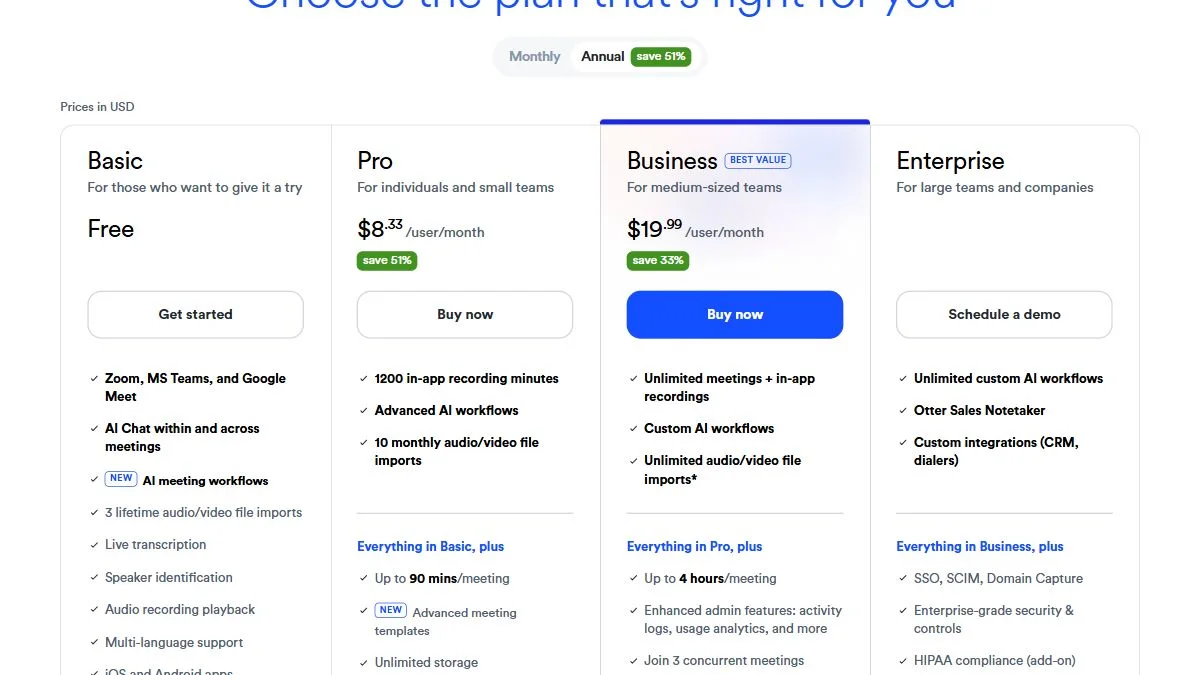
Reading it: on paper, Notta gives more minutes and longer recordings for a similar price. Otter gives more free minutes but caps file imports at three for the life of the account, which matters if your main use is uploading audio files. If your use is recording English-language team meetings, Otter remains a reference. We did not compare the accuracy of the two tools: no figure in this table says which one transcribes better.
Strengths and weaknesses
What works
- Generous volume on Pro: 1,800 minutes a month and 5 hours per recording for $8.17 a month on yearly billing.
- Several ways to capture: bot, no bot, file import, YouTube link, mobile, extension.
- 58 languages advertised for transcription, with translation.
- Free plan with no credit card and a 7-day Business trial.
- Security stated: SOC 2 Type II and GDPR according to the vendor, local recording possible.
What does not
- The free plan caps conversations at 3 minutes: it is a demo more than a real use.
- AI summary languages are narrower than the 58 transcription languages, according to the home page FAQ.
- Custom vocabulary is listed for English and Japanese only.
- Several advanced features are paid add-ons (bilingual translation, extended Brain).
- Accuracy promises come from the vendor, with no published method.
Who Notta suits
It is for you if
- you regularly transcribe meetings, interviews or lectures and want a predictable monthly quota;
- you run video calls and want minutes with action items;
- you want local recording without a bot for sensitive conversations.
It is less suited if
- you have a single file to transcribe once: a pay-as-you-go transcription tool, or another tool’s free quota, will be simpler;
- you want reliable written summaries in a less common language with no review at all;
- you need a fully free tool for long recordings.
Transcribing an audio file with Notta: the principle
We did not use the app for this review, so here is the principle as the vendor describes it, without copying screens we have not seen.
- Create an account (an email address; no card for the free plan).
- In the web app, choose to import an audio or video file, or paste a YouTube link.
- Select the spoken language, then start the transcription.
- Read the text against the recording (it is timestamped and speakers are identified), correct it, then export it. Export is included from the Pro plan.
- Ask for a summary and action items; review before sharing.
FAQ
Is Notta free?
Yes, there is a free plan with no credit card: 120 transcription minutes a month, 50 uploaded files a month, 10 AI summaries, but only 3 minutes per conversation. Paid plans start at $8.17 a month billed annually for Pro. Checked on October 23, 2026.
How much does Notta cost in 2026?
Pro: $8.17 a month billed annually ($97.99 a year). Business: $16.67 a month billed annually ($199.99 a year). Enterprise is custom, from 51 seats. The French page shows monthly billing at €11.69 for Pro and €25.99 for Business. Figures from the official pages on October 23, 2026.
Is Notta better than Otter?
On the official grids, Notta offers more minutes on Pro (1,800 against 1,200) and longer recordings (5 hours against 90 minutes per meeting). Otter offers 300 free minutes but only 3 lifetime file imports. We did not compare their accuracy, so we cannot say which transcribes better.
What are the best Otter alternatives?
Notta is a common one: more minutes and longer recordings on its individual plan, 58 transcription languages and a bot-free mode. HappyScribe and others also compete. Test two tools on the same short clip before you pay.
Does Notta work in other languages?
The vendor advertises 58 languages for transcription and translation. Its FAQ lists English, Japanese, Chinese, Spanish and German, among others, as languages for generated content. Test both transcription and summaries in your language during the trial.
Is Notta accurate?
The vendor claims 98% or more and SOC 2 Type II and GDPR compliance. Those are its statements. Accuracy depends on audio quality, accents and vocabulary: measure it on a clip from your own recording.
Can Notta record a meeting without a bot?
Yes. The vendor offers a bot-free recorder on the desktop app (Mac and Windows) that records on the device. The online meeting recorder uses a bot that joins the call.
Can Notta transcribe a YouTube video?
The vendor says the tool transcribes audio files, video files and YouTube links. The length limit depends on the plan: 3 minutes per conversation on Free, 5 hours per recording on Pro.
Got an interview, a lecture or a meeting to transcribe? Test on a three-minute clip, with your own voice and your own names.